 FacilityCare IQ
The simple way to run a small commercial cleaning company.
Tonight's jobs on your crew's phones, a time clock that knows who was there, checklists in their language, and invoices from the schedule. Free for your first 2 buildings.

You get to the building and you cannot remember the door code. It is in a text message from four months ago, or in a notebook in the other van.
Payday comes and you are piecing hours together from texts and memory. Someone says they were at the clinic until ten. You have no way to check.
It is the 3rd of the month and the invoices are not out, because working out what each building owes means going back through the calendar.
Everything you need to run the company, nothing you don't.
Sites, schedule, time clock, job card and invoices. Set up in an evening, used every night.
Sites & customers
Address, door code, contact, contract rate and who cleans it — one card per building, on the phone before anyone gets out of the van.
Schedule
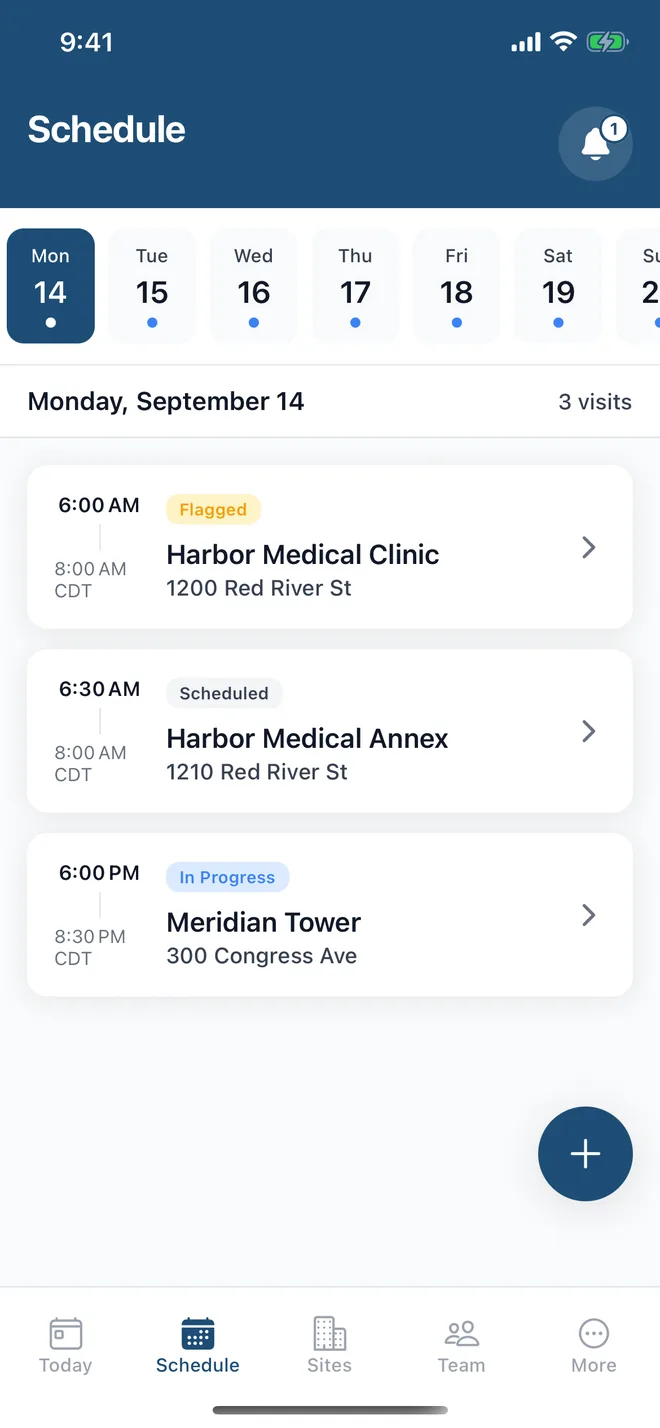
Set a building up once — Tuesdays and Fridays, 6pm — and tonight's list builds itself. Add a one-off job, reschedule or reassign in two taps.
Time clock
Cleaners clock in and out on their phone with a GPS check at the building, so you know who was there and for how long. Hours land on timesheets you can export to CSV for payroll.
Crew job card
Tonight's job in the cleaner's language: address, door code, checklist, your note for the site, a photo if the client asks for one, and one tap for “Running late” or “Couldn't complete”.
Invoicing
The monthly invoice comes from the schedule and the rate, not from a trawl through the calendar. Send it by email with your payment details; mark it paid when the money arrives.
Six languages
English, Spanish, Portuguese, Italian, French and German. Your cleaner reads the checklist in theirs; your client gets the invoice email in theirs.
Comparing tools? Start with the guides: Cleaning business software · Commercial cleaning software
The owner's app and the crew's app
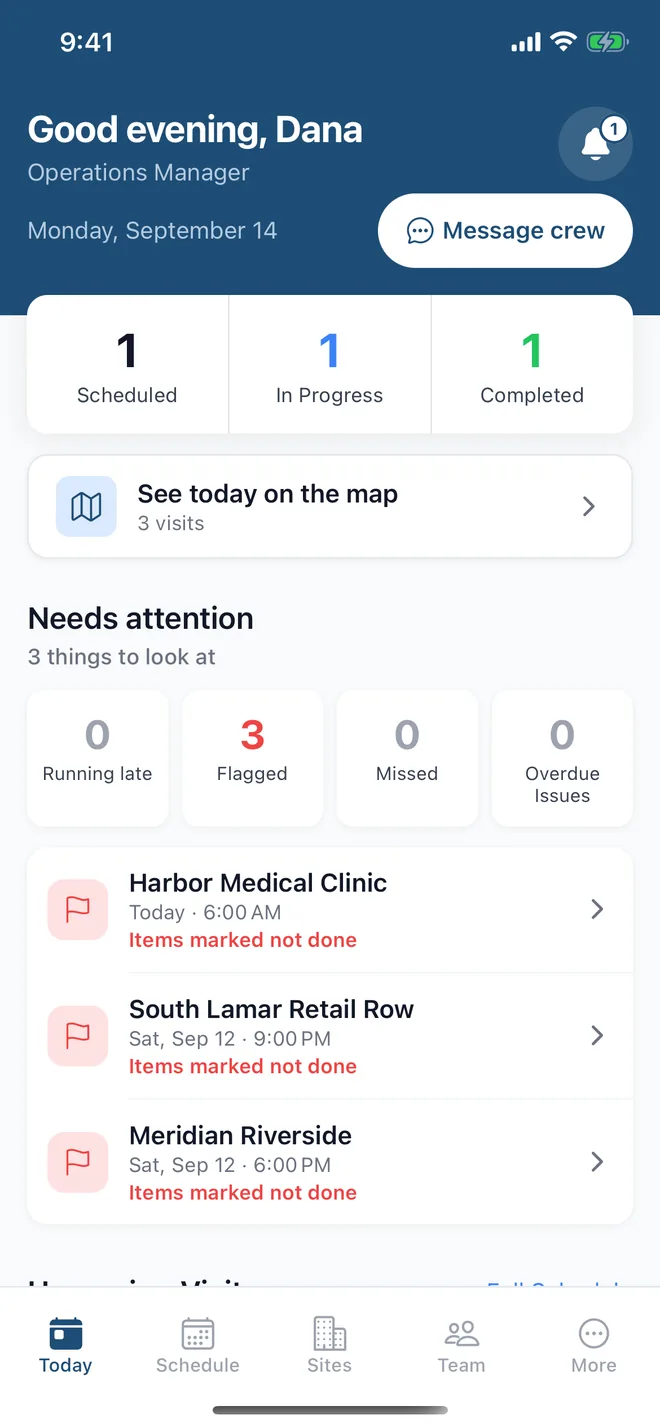
Captured from a live account: what you see running the company, and what your crew sees on the job.
What you see
What your crew sees

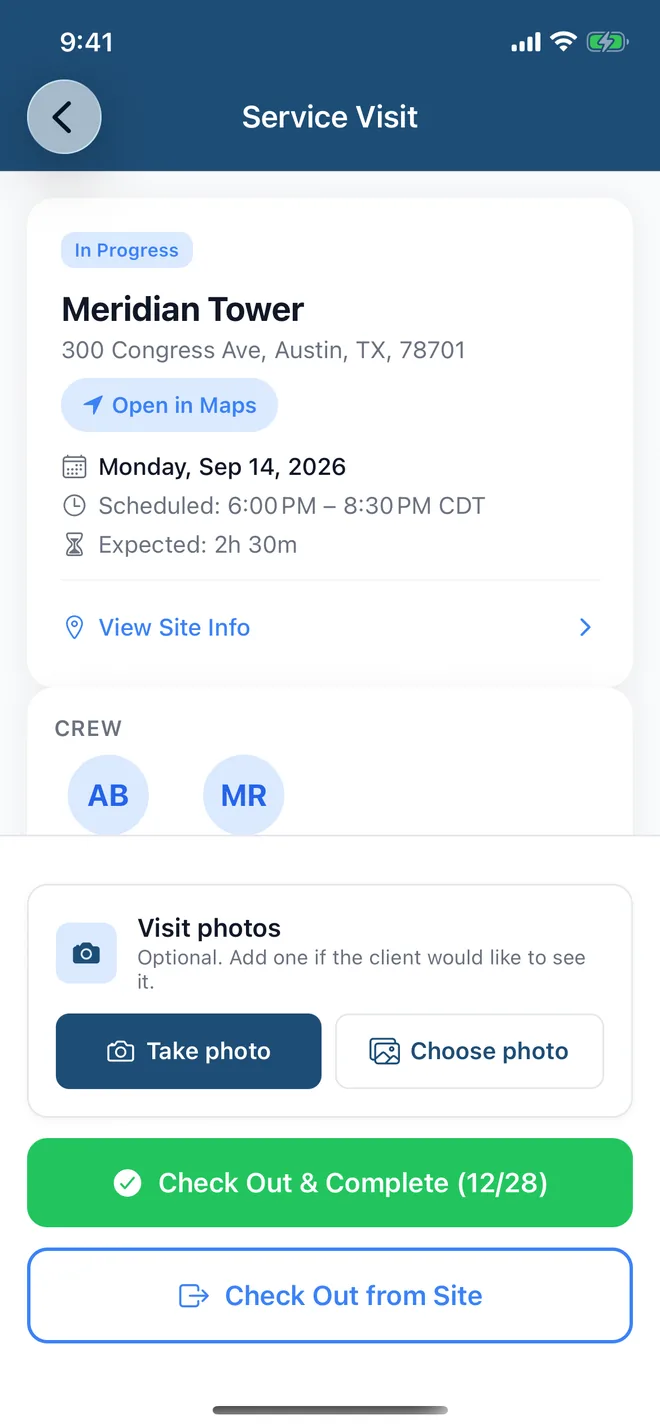

Run the company from your phone. Your crew works from theirs.
Set up sites and schedules, invite your crew, see who is on site and bill your customers from the app. Cleaners open the same app to see tonight's job, clock in, work the checklist and clock out. The checklist builder, month-end reports and data export are best on the web dashboard; everything else runs from the phone.
The app for owners and crew is on iOS and Android.
Works with no signal
In a basement or a building with no bars, crews can still clock in, work the checklist, add a photo, report an issue and clock out. Managers can schedule a one-off job too. Everything syncs on its own once the phone is back online.
- Clock in and out with a GPS check at the building
- Checklist in the cleaner's language — photos optional
- “Running late” and “Couldn't complete” in one tap
- Door code, contact and your note for the site on the job card
- Timesheets from the time clock, exportable to CSV for payroll
- Six languages, chosen per person
Your first building, set up in 5 minutes
No demo to sit through. No annual contract. No setup fee. No IT department. Sign up and add your first building today — the way every other tool in your business already works.
Add your sites
Address, door code, contact and the monthly rate. Pick who cleans it.
Set the schedule
Tuesdays and Fridays at 6pm, or whatever the contract says. From here on, tonight's list builds itself.
Your crew works from the job card
They clock in at the building, work the checklist in their language, add a photo if the site asks for one, and clock out.
You invoice from the schedule
On the 1st, last month's invoice is drafted from the visits your crew finished and the site's rate. Check it and send it by email with your payment details. Timesheets export to CSV for payroll.
Built by a cleaning company in Austin
FacilityCare IQ is made by the team behind a commercial cleaning company in Austin, Texas. Our crews open it every night and our invoices go out of it. The figures below are from our own account, not a customer's.
- 87
- visits logged
Invoices drafted and sent from the product.
Frequently Asked Questions
Straight answers for cleaning company owners weighing their options.
What is cleaning business software?
How does the time clock work?
Is there a free plan for small cleaning companies?
Do my cleaners have to take photos?
Can my cleaning crew use this on their phones?
How much does cleaning company software cost?
How long does it take to set up?
How does invoicing work?
Can I run my cleaning business from my phone?
Tonight's jobs, on your crew's phones by tonight.
Add your first building, set the schedule, invite the crew. Free for your first 2 buildings, no credit card.